All work · AI tool
AI Feedback Tool
I built and shipped an internal Chrome extension that turns a click on any page or component into an AI-drafted Jira ticket, written for both the developer and the coding agent that picks it up.
- ClientHometown
- RoleSenior User Experience Designer
- TeamUsed by PMs and developers
The problem
Filing bugs by hand was tedious. The team didn’t like doing it, it was seen as too time-consuming, and some developers were frustrated by how much time went into writing up each bug manually.
One click to a complete ticket
Click any page or component, and the tool drafts a Jira ticket with everything a developer needs attached: a screenshot, DOM data, and environment details. It also sets a priority and routes the ticket to the right team.
Capture a page or a component
Capture the whole visible page, drag to select an area, or pick a single component. Hovering highlights each element with its selector and size, so you click exactly what’s wrong.


An AI draft, ready to review
The tool drafts the summary and description, and pre-fills the issue type, priority, and labels from what it found on the page. “Why these values?” explains each choice.

Written for two readers
Each ticket is written for two readers: the developer, and the coding agent that picks it up. The same ticket gives a person the context to understand the issue and gives an agent the structure to act on it.
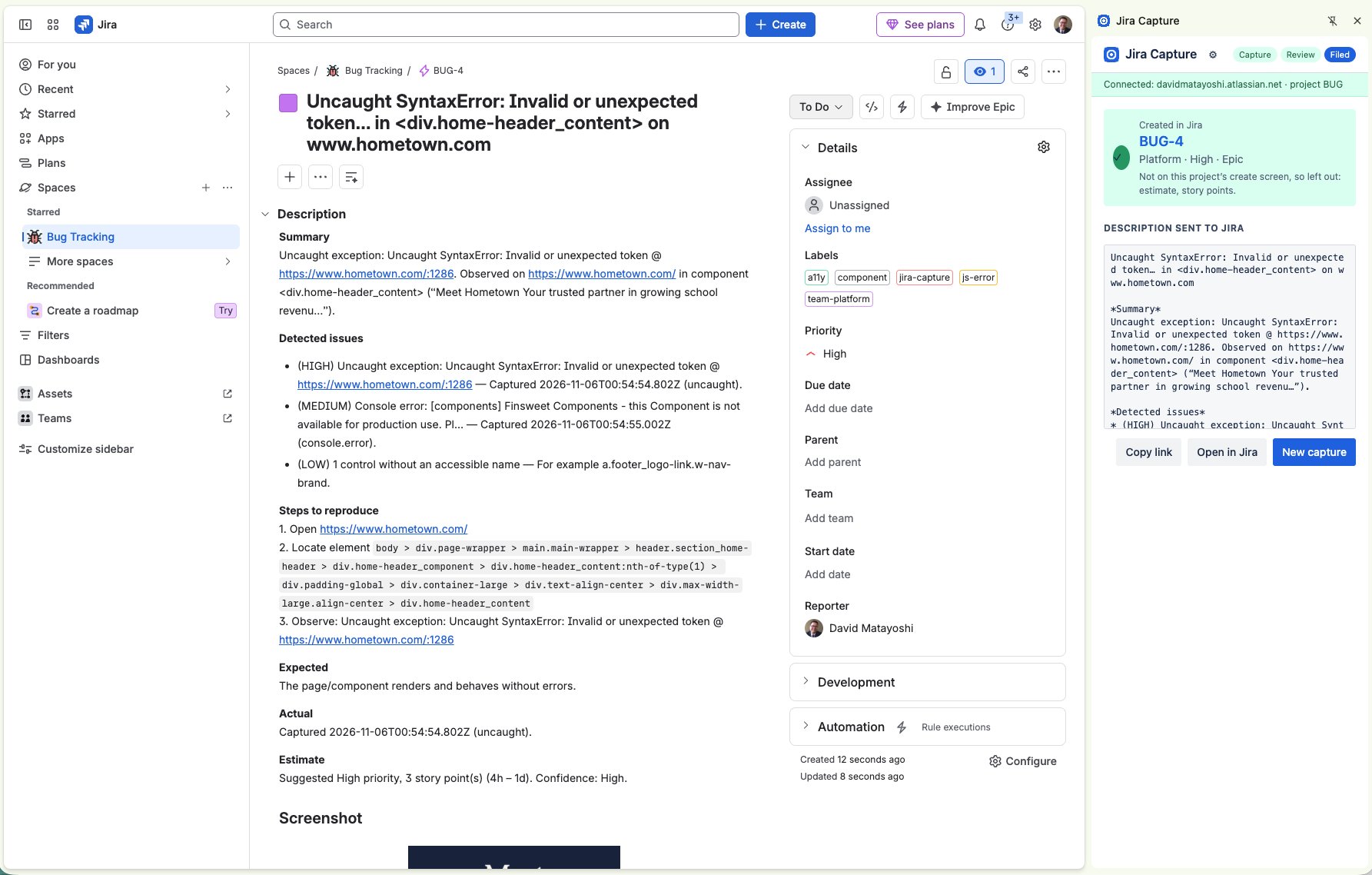
The ticket in Jira
Detected issues are ranked by severity, and the steps to reproduce include the exact element selector. A developer can read it at a glance; a coding agent can follow it to the exact spot on the page.
A person approves every ticket
The AI drafts; people decide. Users review the draft, edit anything that’s off, and approve it before it submits, so nothing reaches Jira without a person signing off.
Review, then file
Before filing, users see every attachment and can uncheck anything unrelated to keep it out of the ticket. Nothing goes to Jira until they click File ticket.

Filed, with a link back
The panel confirms the ticket was created, shows exactly what was sent, and links straight to it in Jira.

Built with Claude Code, shipped to the team
I built the tool myself as a Chrome extension using Claude Code. To roll it out, I shipped it through our internal GitHub so anyone on the team could install it, and ran a short training session to get people started. My team’s PMs and developers adopted it for filing feedback and bugs.
About these screens
The original runs internally at Hometown. The screens here come from a recreation I rebuilt for this portfolio, so no internal data is shown.
Outcome
The tool replaced a manual process the team had avoided. Filing a bug became a click and a quick review, and the team got better at filing and tracking bugs as a result.
- Easier to file
A click on the problem, a quick review, and the ticket is filed with everything attached.
- Easier to track
Consistent, complete tickets made bugs easier to follow from report to fix.
- Adopted
PMs and developers used it in production for filing feedback and bugs.